

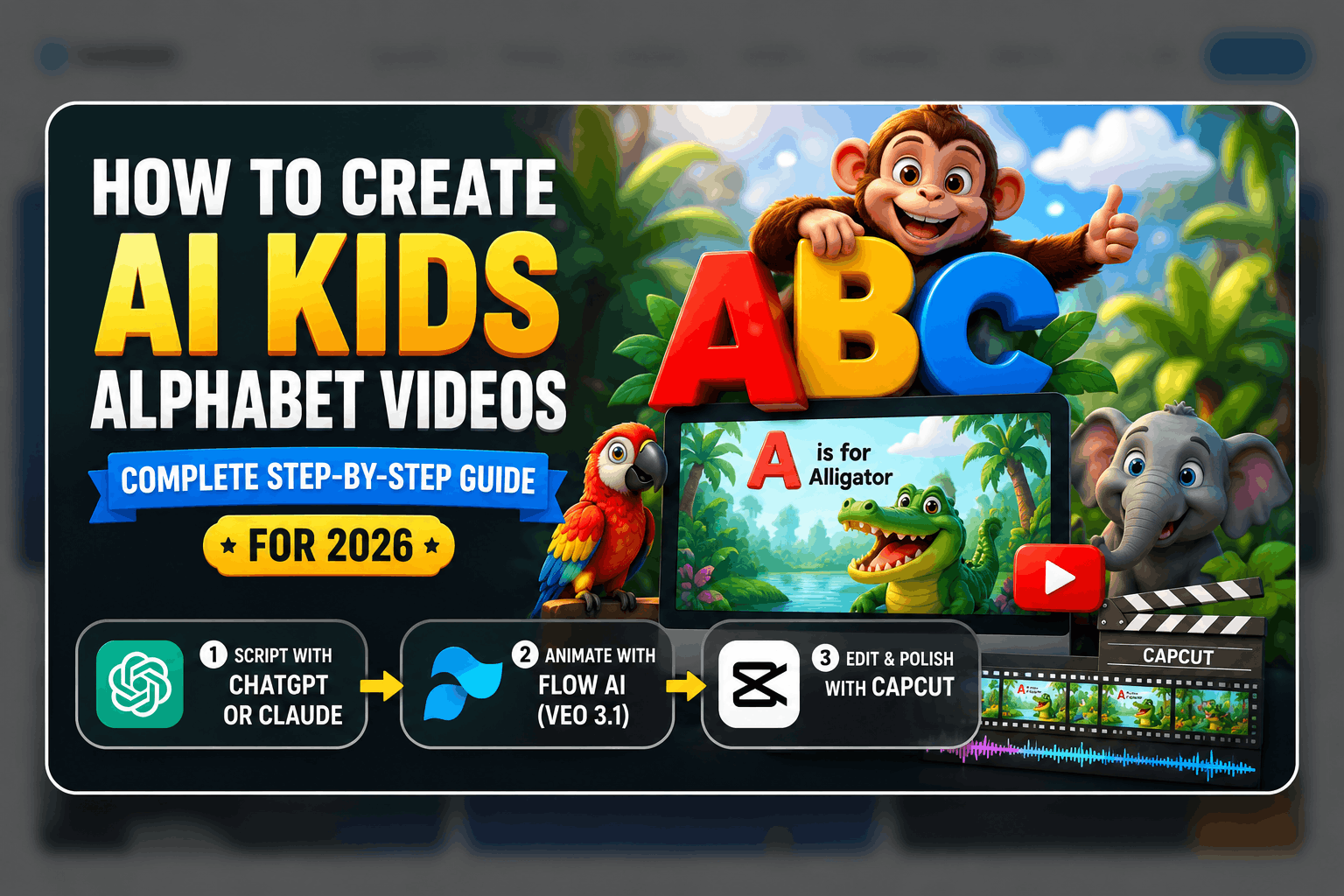
If you’ve ever spent an afternoon scrolling through YouTube Kids or searched for educational content for your little one, you already know how wildly popular alphabet and learning videos are for children. Colorful characters, catchy sounds, simple animations — these videos rack up millions of views and keep kids genuinely engaged for minutes at a time. But here’s what most people don’t realize: in 2026, you don’t need a professional animation studio, a voice actor, or a six-figure production budget to create this kind of content. With Claude or ChatGPT, Flow AI, and CapCut, anyone can produce high-quality, engaging AI Kids Alphabet Videos from scratch — completely from home.
Whether you’re a parent who wants to create personalized learning content for your child, an educator building a YouTube channel, or a content creator looking to tap into one of the most evergreen niches on the internet, this step-by-step guide will walk you through the entire process from idea to final upload-ready video.
Why AI Kids Alphabet Videos Are a Goldmine Niche
Before diving into the how, it’s worth understanding the why. Children’s educational content — especially alphabet, number, and phonics videos — is one of the most consistently high-performing niches on YouTube and other video platforms. Here’s why:
Evergreen demand: New children are born every single day. Parents of toddlers and preschoolers are constantly searching for engaging, safe, and educational screen time. The demand never drops.
High watch time: Kids rewatch their favorite videos dozens of times. A single good alphabet video can accumulate millions of views over months and years, not just days.
Low competition from quality creators: While the niche is popular, most creators use expensive animation software or outsource production. AI tools have now leveled that playing field completely.
Monetization potential: Children’s content channels on YouTube, once established, can generate significant ad revenue, merchandise opportunities, and even licensing deals.
Parent trust: Parents actively seek out educational content for their children, making discovery through search far more reliable than in entertainment niches.
What You’ll Need for This Workflow
The entire production process breaks down into 3 clear stages, each powered by a specific tool:
- Ideation & Script Writing — Claude or ChatGPT
- Video Animation — Flow AI (Veo model)
- Editing, Music & Final Polish — CapCut
No expensive software, no design degree, no prior video experience required. Let’s walk through every step in detail.
Step 1: Ideation & Script Writing (Claude or ChatGPT)
The foundation of any great kids alphabet video is a strong creative concept paired with a well-structured script. This is where Claude or ChatGPT become your most powerful creative partners. These AI tools handle the heavy lifting of ideation, scripting, and prompt creation so you can focus on execution.
What to Ask Claude or ChatGPT
Here’s how to use AI for your script and concept development:
Concept Development Ask Claude or ChatGPT to help you develop a unique angle for your alphabet video. Generic “A is for Apple” content exists everywhere — what will make your version stand out? Some ideas that work well:
- Animals and their sounds for each letter (A is for Alligator — SNAP!)
- Space-themed alphabet with planets, astronauts, and rockets
- Underwater ocean adventure with sea creatures for each letter
- Jungle safari alphabet with colorful exotic animals
- Fantasy world alphabet with dragons, elves, and magical objects
Script Writing Once you’ve locked in your concept, ask Claude or ChatGPT to write a complete script. A good kids alphabet video script should include:
- A bright, energetic opening hook (5-10 seconds)
- Each letter presented clearly with its name, sound, and an example word
- A simple, repetitive sentence structure that young children can follow
- A fun closing that encourages rewatching or subscribing
- Suggested visual descriptions for each letter segment
Prompt Engineering for Flow AI After the script is done, use Claude or ChatGPT to convert each letter segment into a detailed video generation prompt for Flow AI. This is the step that determines the visual quality of your final video — the more specific and imaginative the prompt, the better the output.
Example Conversation with Claude or ChatGPT
“I want to create a YouTube Kids alphabet video for children aged 2-5 years old. The theme is a jungle safari adventure. Please write a complete script that introduces all 26 letters of the alphabet, with each letter tied to a jungle animal. Include the letter name, its phonetic sound, the animal name, and a fun one-sentence description. Then convert the first five letters into detailed AI video generation prompts suitable for an animated video tool.”
This single prompt will give you a complete production-ready script plus your first batch of video prompts, all in one go.
Step 2: Video Animation (Flow AI)
With your script and prompts ready, it’s time to bring the alphabet world to life visually. Flow AI (available at flow.google) is Google’s unified AI creative studio, powered by the Veo 3.1 model — one of the most advanced text-to-video and image-to-video AI systems available today. For kids alphabet content, Flow AI delivers the colorful, smooth, and engaging animation style that children respond to best.
Why Flow AI Works Perfectly for Kids Content
- Vivid color output: Flow AI’s Veo model produces bright, saturated, visually rich scenes that naturally attract young viewers
- Character consistency: With the right prompts, you can maintain consistent character appearances across all 26 letter segments
- Native audio generation: Flow AI can generate synchronized ambient sound, animal sounds, and environmental audio directly within the video — reducing your post-production workload
- Image-to-video support: You can generate a reference image first and then animate it, giving you more control over how each character or scene looks
How to Generate Your Alphabet Videos in Flow AI
Option A — Text to Video (Fastest)
- Open Flow AI at flow.google and go to the video generation section
- Paste your letter-specific prompt — for example: “A cheerful, cartoonish alligator wearing a small explorer hat stands in a lush green jungle clearing, looking directly at camera, bright sunshine, vivid colors, friendly expression, child-friendly animation style, smooth motion”
- Select portrait or landscape orientation based on your target platform (16:9 for YouTube, 9:16 for YouTube Shorts or TikTok)
- Generate and preview the clip
- If the result is too realistic or not bright/friendly enough for kids, add style modifiers like “cartoon style,” “soft lighting,” “pastel colors,” or “Pixar-inspired” to your prompt
- Download the clip and move to the next letter
Option B — Image to Video (More Control)
- First, generate a reference image for your character in Flow AI’s image tool
- Use the image to create a consistent “mascot” or animal character that appears throughout your alphabet series
- Feed that image into the video tool and animate it with your letter-specific prompt
- This method produces more consistent visual identity across all 26 letters
Pro Tips for Kids Content on Flow AI
- Prompt for bright, bold visuals: Kids respond to high-contrast, saturated colors. Always include “vivid colors,” “bright lighting,” or “colorful” in your prompts
- Keep movements simple and smooth: Young children can be overwhelmed by fast or chaotic motion. Use prompts like “gentle movement,” “slow pan,” or “smooth animation”
- Generate 2-3 variations per letter: Pick the best output rather than settling for the first result
- Use the Extend feature: Flow AI’s clip extension feature lets you lengthen each 8-second clip, which is useful for giving enough time to display each letter clearly
Organizing Your Clips
As you generate clips for each of the 26 letters, save them in a clearly labeled folder (A_alligator.mp4, B_bear.mp4, etc.). This makes the editing stage much smoother and faster.
Step 3: Video Editing, Music & Final Polish (CapCut)
Your 26 individual letter clips are ready. Now it’s time to assemble them into a complete, polished alphabet video that children will love and parents will trust. CapCut is the perfect tool for this — it’s free, available on mobile and desktop, and comes loaded with features that are ideal for children’s content production.
Full CapCut Editing Workflow for Kids Alphabet Videos
1. Create a New Project Open CapCut and start a new project. Set your canvas size to 1920×1080 for YouTube standard, or 1080×1920 if you’re making Shorts/Vertical content.
2. Import and Arrange Your Clips Import all 26 letter clips and arrange them in alphabetical order on the timeline. Each clip should be roughly 5-8 seconds long to give young children enough time to absorb the letter, sound, and visual.
3. Add Letter Text Overlays For each clip, add a large, bold, child-friendly text overlay showing:
- The uppercase letter (A)
- The lowercase letter (a)
- The example word (Alligator)
Use rounded, playful fonts like Comic Sans, Fredoka One, or Baloo — these are more readable and appealing to young children than formal serif fonts. Make the text large, colorful, and positioned clearly so it doesn’t overlap with the main character.
4. Add Phonetic Sound Labels Consider adding the phonetic sound below the letter — for example, “/æ/ as in Alligator.” This adds genuine educational value and makes your content stand out from basic alphabet videos.
5. Add Background Music Children’s alphabet videos work best with upbeat, repetitive, simple background music. In CapCut’s audio library, search for:
- “Kids educational music”
- “Alphabet song instrumental”
- “Happy children background music”
- “Playful cartoon music”
Set the music volume low enough that it doesn’t overpower the visual learning element — around 20-30% volume is usually right.
6. Add a Voiceover (Optional but Recommended) A clear, friendly voiceover dramatically increases the educational value of your alphabet video. You have two options:
- Record your own voice directly in CapCut using the voiceover feature — a warm, enthusiastic tone works best for children
- Use CapCut’s AI Text-to-Speech to generate a child-friendly voice automatically from your script
If using AI voice, choose a tone labeled “cheerful,” “friendly,” or “young” for the most appropriate sound.
7. Add Transition Effects Between each letter segment, add a simple, fun transition:
- Colorful star wipe
- Bouncing ball transition
- Simple fade or zoom
- Quick flash of the letter before the next clip begins
Avoid overly complex or fast transitions — keep everything gentle and predictable for young viewers.
8. Add an Opening and Closing Sequence Create a 5-10 second intro that clearly shows your channel name and the video title (e.g., “ABC Jungle Adventure — Learn the Alphabet!”). Similarly, add a closing screen with:
- A “Watch Again” prompt
- Links to other videos in your channel
- A subscribe button reminder
9. Color Grade for Kids Use CapCut’s color adjustment tools to increase brightness and saturation slightly across the entire video. Kids respond much better to bright, warm visuals than dull or muted tones.
10. Export and Upload Export your finished video in 1080p or higher. For YouTube, use MP4 format with H.264 encoding. Include your keyword-rich title, description, and tags when uploading.
Click Here: How to Earn Money with AI in 2026
MASTER PROMPT: AI Kids Alphabet Videos
Here is a complete, ready-to-use Master Prompt you can paste directly into Claude or ChatGPT to get everything you need in one go:
ROLE: You are an expert children's educational content creator and AI
video prompt engineer specializing in YouTube Kids alphabet content
for ages 2-5.

TASK: Help me create a complete AI Kids Alphabet Video production package.

THEME: [Choose one — Jungle Safari / Ocean Adventure / Outer Space /
Enchanted Forest / Farm Animals / Dinosaur World / Fairy Tale Kingdom]

DELIVERABLES I NEED:

1. COMPLETE VIDEO SCRIPT:
   Write a full A-Z alphabet script where each letter includes:
   - The uppercase and lowercase letter
   - The phonetic sound (e.g., "A says /æ/")
   - A [THEME]-related word for each letter
   - One fun, simple sentence about that word
   - Keep language at a 2-5 year old level

2. FLOW AI VIDEO PROMPTS:
   For each of the 26 letters, write a detailed Flow AI
   video generation prompt that includes:
   - The main character/animal/object for that letter
   - Setting and background description
   - Visual style (child-friendly, vibrant, cartoon, colorful)
   - Camera movement (gentle, slow, smooth)
   - Lighting (bright, warm, cheerful)
   - Mood (friendly, fun, safe for children)

3. TEXT OVERLAY SUGGESTIONS:
   For each letter, suggest:
   - Font color combination
   - Text positioning (top/center/bottom)
   - Any fun emoji or symbol to add visual flair

4. VIDEO TITLE & DESCRIPTION:
   Write an SEO-optimized YouTube title, description (300 words),
   and 15 relevant tags for this alphabet video.

5. THUMBNAIL CONCEPT:
   Describe the ideal thumbnail for maximum clicks from parents
   and kids — including colors, text, and main visual element.

OUTPUT FORMAT: Organize everything letter by letter from A to Z,
then add the YouTube metadata at the end.
Best Themes for AI Kids Alphabet Videos in 2026
Not sure which theme to go with? Here are the top-performing concepts for children’s alphabet content right now:
Jungle Safari (Most Popular) Animals are universally beloved by children, and jungle creatures offer vivid, colorful imagery for every letter. A is for Alligator, B is for Buffalo, C is for Cheetah — the theme practically writes itself.
Ocean Adventure Underwater sea creatures fascinate toddlers. The unique colors of ocean life (bright fish, coral reefs, glowing jellyfish) produce stunning visual output in Flow AI.
Outer Space Space-themed content performs incredibly well for slightly older children (3-5 years). A is for Astronaut, B is for Black Hole, C is for Comet — it blends imagination with early science concepts.
Dinosaur World Dinosaurs are perennially popular with young children, especially boys aged 2-5. T-Rex roars and colorful prehistoric landscapes generate huge engagement.
Farm Animals The most traditional and parent-approved theme. Simple, familiar, and immediately recognizable for very young toddlers (12 months to 3 years).
Click Here: Generate Unlimited AI Videos with Google VEO 3.1
YouTube SEO Tips for Kids Alphabet Videos
Creating the video is only half the battle — getting it discovered is equally important. Here’s how to optimize your alphabet videos for search:
Keyword-Rich Title: Use templates like:
- “ABC [Theme] — Learn the Alphabet for Kids | [Channel Name]”
- “Alphabet Song for Children | [Theme] A to Z Learning Video”
- “Learn ABC with [Theme] | Fun Alphabet Video for Toddlers”
Description Optimization: In the first 150 characters of your description, include your primary keyword naturally. Then expand with a 2-3 paragraph description mentioning the letters, the theme, age range, and educational value.
Tags to Include: alphabet video for kids, learn ABC, ABC for toddlers, alphabet song, kids learning video, educational video for children, phonics for kids, letters for preschoolers, [your theme] alphabet, YouTube Kids alphabet
Thumbnail Design: Bright background (yellow, orange, or sky blue), large bold letter “ABC” text, one colorful character from your video, and your channel name. Thumbnails with faces (even cartoon faces) consistently outperform those without.
Consistency is Key: The channels that dominate children’s educational content post new alphabet or learning videos consistently — at least once a week. A series format (26 individual letter videos, theme-specific alphabet packs) performs better over time than one-off uploads.
Monetization Opportunities for Kids Alphabet Channels
Once your channel grows, there are multiple ways to turn your AI-produced content into income:
YouTube AdSense: Children’s educational content earns solid RPM (Revenue Per Mille) rates, especially in English-speaking markets. Consistent uploads and growing watch hours unlock monetization.
YouTube Membership: Offer exclusive content, downloadable activity sheets, or ad-free versions to channel members.
Digital Downloads: Sell printable alphabet worksheets, coloring pages, or flashcards that match your video themes on platforms like Etsy or Gumroad.
Sponsorships: Children’s learning app companies, toy brands, and educational publishers actively seek out established kids’ YouTube channels for sponsored content partnerships.
Merchandise: Plush toys, t-shirts, or backpacks featuring your video’s characters can become a secondary revenue stream once your channel characters become recognizable.
Common Mistakes to Avoid
Skipping the script: Jumping straight into video generation without a clear script leads to inconsistent content and wasted generation credits. Always script first.
Using adult-oriented visual styles: Flow AI defaults to realistic imagery. Always add “cartoon style,” “child-friendly,” “animated,” or “colorful illustration” to your prompts to keep visuals appropriate for young audiences.
Neglecting audio quality: Children are extremely sensitive to audio. Unclear voiceovers, jarring music, or inconsistent volume levels will cause young viewers to lose interest immediately.
Ignoring YouTube Kids compliance: If you’re posting to YouTube and targeting children, make sure your content complies with COPPA guidelines and mark your videos as “made for kids” appropriately.
Posting inconsistently: Children’s channels grow through habit. Parents look for channels that post regularly. One video a month won’t build an audience — aim for weekly uploads.
Conclusion
AI Kids Alphabet Videos represent one of the most exciting opportunities at the intersection of artificial intelligence and children’s education in 2026. The tools are accessible, the workflow is clear, and the potential audience is enormous. Claude or ChatGPT handle the creative scripting and prompt engineering, Flow AI produces the vivid, engaging animations that children love, and CapCut ties everything together into a polished, publish-ready video.
Whether your goal is to help your own child learn the alphabet through personalized content, build a thriving YouTube Kids channel, or simply explore what’s possible with today’s AI creative tools — this three-tool workflow gives you everything you need to produce genuinely high-quality educational videos without a production team or a studio budget.
Use the Master Prompt above, pick your theme, and create your first AI Kids Alphabet Video today. The A-Z adventure starts right here.