


If you’ve spent any time on YouTube Shorts, Instagram Reels, or TikTok recently, you’ve probably come across a wildly popular new format — beloved cartoon characters like Motu and Patlu standing in real Pakistani cities, talking directly to camera in Hindi, and promoting content channels with cheerful energy and expressive gestures. These videos get millions of views, sky-high engagement, and are being shared across every platform because they combine the nostalgic power of classic cartoon characters with cutting-edge AI video generation.
The exciting truth? You don’t need a professional animation studio, a team of VFX artists, or even a single frame of original animation to create these videos. With just ChatGPT’s image generation and Flow AI’s Veo video animation model, you can produce cinematic Motu Patlu city videos — complete with Hindi lip sync, expressive gestures, and authentic Pakistani highway backgrounds — right from your phone or laptop.
This complete tutorial covers every step of the process, including the exact image prompt, the exact video prompt, the reference image you need, and a Master Prompt template so you can recreate and customize this format for any city, any dialogue, and any purpose.
Why Motu Patlu AI City Videos Are Going Viral
Understanding why this format performs so well helps you create content that genuinely connects rather than just copying a surface-level trend.
Instant recognition and emotional connection. Motu and Patlu have been a part of South Asian childhood for over a decade. The moment viewers see these characters — even in an AI-generated scene — they feel an immediate emotional pull. Nostalgia is one of the most powerful engagement drivers on social media, and this format weaponizes it brilliantly.
Pakistani location specificity drives sharing. When people see cartoon characters they love standing on the Islamabad Expressway or a familiar city highway, they feel personally seen. Local specificity — real road signs, expressway details, Pakistani trees and sky — makes the content feel made for them, not for a generic global audience. This drives massive local sharing.
Hindi dialogue creates accessibility. Hindi is understood across Pakistan, India, and the South Asian diaspora worldwide. A Motu and Patlu video in natural, energetic cartoon Hindi reaches hundreds of millions of potential viewers instantly.
The call-to-action format works. These videos aren’t just entertainment — they’re cleverly structured as channel promotion pieces where the characters ask viewers to follow, like, comment, and share. Because the CTA comes from beloved cartoon characters rather than a creator’s face-to-camera plea, viewers respond far more warmly to it.
What You’ll Need for This Workflow
The entire production workflow uses just two tools:
- ChatGPT (GPT-4o) — For generating the reference image and character-accurate scene image
- Flow AI (Veo model) — For animating the image into a lip-synced, gesture-accurate cartoon video
No video editing experience required. No animation skills. No studio. Let’s walk through every step.
The Reference Image — Download & Save This First
Before you start generating anything, you need the right character reference image. This is the single most important element of the entire workflow. The quality and consistency of your final video depends almost entirely on how accurate and detailed your reference image is.
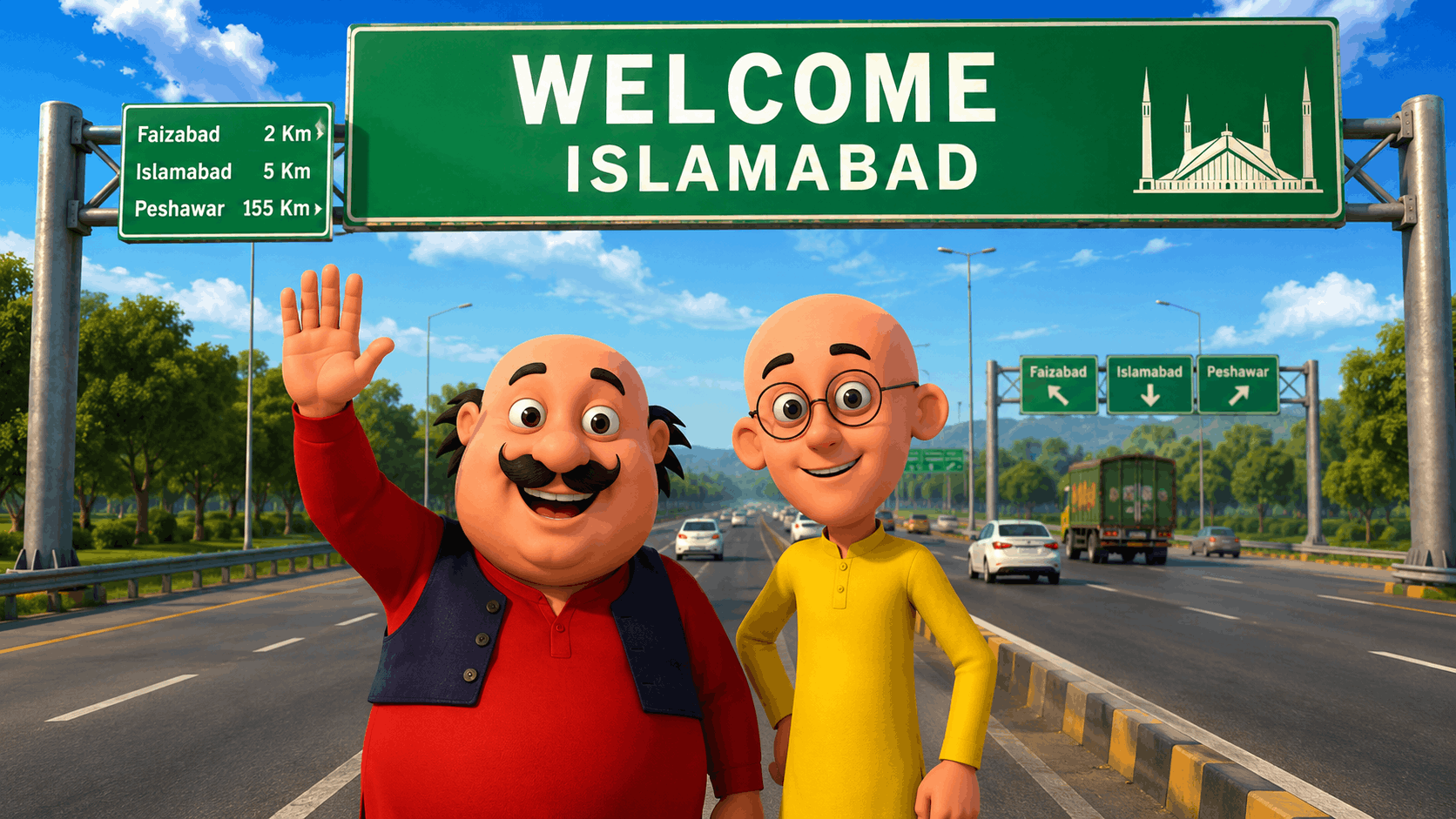
Below is the reference image used in this tutorial — Motu and Patlu standing on the Islamabad Expressway under the iconic green Welcome billboard, in cinematic 3D render style with full Pakistani highway details:


⬇️ Download this image and save it to your device before proceeding to Step 1.
This image will be used as your character reference in ChatGPT to generate scene variations, and as your visual reference in Flow AI to produce the animated video. Using the exact reference image ensures character consistency — same faces, same clothes, same proportions, same art style — across every generation.
Step 1: Image Generation (ChatGPT — GPT-4o)
With your reference image saved, open ChatGPT (make sure you’re using GPT-4o, which supports image uploads and image generation). Upload the reference image directly into your ChatGPT conversation, then paste the following image generation prompt.
The Complete Image Generation Prompt
Use the uploaded image as the exact character reference. Keep the same
characters, faces, clothes, and original art style exactly as shown.

Create a modern highway scene where Motu and Patlu stand smiling
together below a large green Pakistan highway welcome billboard.
The billboard reads:

WELCOME
[Islamabad]

Include the following Pakistani expressway details:
- Wide multi-lane highway with clear road markings
- Green trees lining both sides of the expressway
- Additional green highway signs in the background
- Pakistani passenger cars and a truck on the road
- Bright blue sky with realistic white clouds
- Street lights on both sides
- Directional signboard showing: Faizabad 2 Km, Islamabad 5 Km,
  Peshawar 155 Km
- Motu waving with his right hand, smiling cheerfully
- Patlu standing beside him, smiling with glasses on
- Both characters looking directly at the camera
- Cinematic lighting, vibrant colors, centered composition
- Ultra-detailed, 8K quality, vertical 9:16 portrait orientation
- Photorealistic background with 3D cartoon-style characters
Tips for Better ChatGPT Image Results
- Upload the reference image every single time you start a new conversation or generate a new variation. ChatGPT doesn’t retain images between sessions
- Generate 3-4 variations and select the one where character faces, proportions, and clothing match the reference most accurately
- If Motu’s mustache or Patlu’s glasses are missing or wrong, add “Motu must have a thick black mustache and side-swept black hair. Patlu must wear round glasses and be slim and bald.” to the prompt
- If the billboard text is incorrect or missing, specify: “The billboard text must be exactly readable as WELCOME on the first line and [Islamabad] on the second line, white text on dark green background”
- Save the best generated image to your device — this becomes your Flow AI input
Step 2: Video Animation (Flow AI — Veo Model)
With your high-quality character image ready, open Flow AI at flow.google. This is Google’s AI creative studio powered by the Veo 3.1 model — the most capable AI video generator currently available for cinematic character animation with lip sync and natural gesture support.
Go to the Image to Video section, upload your ChatGPT-generated image, and paste the following complete video animation prompt.
The Complete Video Animation Prompt
Use the uploaded image as the ONLY visual reference.

Keep EVERYTHING exactly the same as the reference image:
– Same Motu and Patlu appearance
– Same clothes and colors
– Same body proportions
– Same poses at the beginning
– Same road, trees, lighting, background, shadows and environment
– Same camera angle, framing and composition
– No scene changes
– No new objects
– No background changes
– No zoom
– No camera movement
– No transitions
– Static shot from beginning to end

Animate only the characters:
– Natural eye blinking
– Natural breathing motion
– Realistic facial expressions
– Accurate Hindi lip synchronization
– Motu talks with cheerful expressions and points toward the camera
  with his right hand during the first and third dialogue lines
– Patlu smiles, nods, opens his palms while speaking and uses natural
  hand gestures during his dialogue lines
– Both characters keep looking directly into the camera throughout
– Maintain the exact same environment from beginning to end

STRICT LANGUAGE RULES:
– Audio must be ONLY in Hindi
– Do NOT speak English
– Do NOT translate into English
– Do NOT mix Hindi and English
– Do NOT generate English subtitles
– Do NOT generate English captions
– Do NOT change the dialogue
– If English is generated, regenerate the entire audio in Hindi only
– Use native Indian Hindi pronunciation
– Cartoon-style energetic voices

DIALOGUE — Speak EXACTLY as written:

मोटू:
"दोस्तों, अब हमें VM Editor से मिलने जाना है।"

पतलू:
"तो जल्दी से इस वीडियो को VM Editor के पास शेयर कर दो।"

मोटू:
"हो सकता है अगली वीडियो VM Editor के साथ ही बने।"

पतलू:
"अगर आप भी हमसे मिलना चाहते हो, तो फॉलो, लाइक और कमेंट ज़रूर करो।"

Voice Style:
– Native Indian Hindi
– Fun cartoon voice
– Energetic and expressive
– Clear pronunciation
– Natural pauses between lines
– Perfect lip synchronization
– High-quality expressive character acting

FINAL OUTPUT:
A high-quality cinematic cartoon animation where the uploaded image
remains visually identical throughout, and only Motu and Patlu
naturally speak the Hindi dialogue with matching lip sync and
expressive hand gestures — no background changes, no camera
movement, static environment only.
Tips for Better Flow AI Video Results
- Use the highest-quality image possible as your input — blurry or low-resolution images will produce poor video output
- Generate 2-3 variations of the video and compare lip sync accuracy and gesture quality
- If the characters move too much or the background changes, add “Absolutely no background movement. Completely static scene. Only face and hand animation.” to the prompt
- If English audio is generated instead of Hindi, regenerate using: “CRITICAL: All audio must be in Hindi only. Reject any English audio generation completely.”
- Use the Extend feature to add extra seconds if the dialogue feels cut off at the end
MASTER PROMPT TEMPLATE — Customize for Any City or Channel
Once you’ve created your first Islamabad highway video, you can replicate this format for any Pakistani city, any channel name, and any promotional dialogue. Here is the complete Master Prompt template — fill in the brackets to customize:
Image Generation Master Prompt (ChatGPT)
Use the uploaded image as the exact character reference.
Keep the same Motu and Patlu characters, faces, clothes, and art style.

Create a modern highway scene where both characters stand smiling
below a large green Pakistan highway welcome billboard.
The billboard reads:
WELCOME
[CITY NAME]

Pakistani expressway environment details:
- Wide multi-lane highway with clear lane markings
- Green trees lining both sides of the road
- [CITY-SPECIFIC LANDMARK visible in far background — optional]
- Pakistani vehicles on the road (cars, trucks, motorcycles)
- Bright blue sky with white clouds
- Street lights visible
- Distance signboard: [NEARBY AREA] [X] Km, [CITY] [Y] Km
- Motu waving right hand, laughing and happy
- Patlu standing beside, smiling with round glasses
- Both looking directly at camera
- Ultra-detailed, cinematic, 8K, vertical 9:16 portrait
- Vibrant colors, centered composition, photorealistic background
Video Animation Master Prompt (Flow AI)
Use the uploaded image as the ONLY visual reference.
Keep ALL visual elements identical — same characters, same background,
same lighting, same camera angle. Static shot only.

Animate characters only: natural blinking, breathing, facial
expressions, and Hindi lip synchronization.

[CHARACTER 1] uses [GESTURE STYLE] during dialogue.
[CHARACTER 2] uses [GESTURE STYLE] during dialogue.
Both look directly at camera throughout.

STRICT RULE: Audio in Hindi only. No English. No mixed language.

DIALOGUE:
[CHARACTER 1]: "[LINE 1]"
[CHARACTER 2]: "[LINE 2]"
[CHARACTER 1]: "[LINE 3]"
[CHARACTER 2]: "[LINE 4]"

Voice: cartoon-style, energetic, native Hindi, clear pronunciation,
natural pauses, perfect lip sync.
City Variation Ideas for Your Content Series
This format works brilliantly as a series — one video per major Pakistani city, each with a new Welcome billboard and fresh dialogue. Here are the highest-performing city variations to create next:
Lahore Edition Billboard: WELCOME [Lahore] with Minar-e-Pakistan icons on the sign. Background can include glimpses of historic Lahore architecture in the far distance.
Karachi Edition Billboard: WELCOME [Karachi] with sea-themed elements. Background highway leading toward the city with coastal light.
Peshawar Edition Billboard: WELCOME [Peshawar] with the signboard showing Islamabad 155 Km, Kabul 228 Km — instantly recognizable to viewers from KPK.
Multan Edition Billboard: WELCOME [Multan] — great for the central Punjab audience which is enormous on Reels and Shorts.
Quetta Edition Billboard: WELCOME [Quetta] with mountain background elements — visually distinctive and underserved in AI cartoon content.
Each city variation requires only minor changes to your image prompt. The character design, dialogue structure, and video animation prompt remain essentially the same — making this a highly scalable content production workflow.
Dialogue Customization Guide
The dialogue structure used in this tutorial follows a proven 4-line CTA formula that drives engagement on short-form platforms:
- Line 1 (Motu): Introduces the destination or action — creates intrigue
- Line 2 (Patlu): Reinforces the action with urgency — drives the share behavior
- Line 3 (Motu): Teases future content — creates anticipation and return visits
- Line 4 (Patlu): Direct CTA — follow, like, comment — delivered warmly
You can adapt this formula for any promotional purpose:
मोटू: "दोस्तों, [आपका चैनल नाम] पर बहुत कुछ खास आने वाला है।"
पतलू: "तो जल्दी से [चैनल नाम] को सब्सक्राइब कर लो।"
मोटू: "हम [शहर का नाम] से आपके लिए एक धमाकेदार वीडियो लाए हैं।"
पतलू: "लाइक करो, शेयर करो, और कमेंट में बताओ कहाँ से देख रहे हो!"
Simply replace the bracketed text with your channel name and city, and your customized Hindi dialogue is ready to paste into the video prompt.
Performance Tips — Getting the Most Viral Results
Keep videos under 45 seconds. The dialogue in this format is short by design. Don’t add filler — four tight lines of dialogue with expressive delivery performs better than a longer, slower video.
Post at optimal times. For Pakistani and South Asian audiences, the highest engagement windows are typically 8-10 PM local time on weekdays and 2-6 PM on weekends.
Use strong thumbnail frames. The single most important factor for YouTube Shorts and Reels click-through is the thumbnail. Use the clearest, most expressive frame from your video — ideally where Motu is mid-gesture and both characters are fully visible with the city sign prominent.
Add your channel watermark. Since these videos are easy to repost, always add a subtle but visible channel name watermark in the corner during CapCut editing.
Pin the first comment. Immediately after posting, pin a comment asking “Kaun kaun dekh raha hai? Comment mein apna shehar likho!” — this question-format comment dramatically increases comment section engagement and signals to the algorithm that your content is driving interaction.
Create in series, post in sequence. City after city, week after week. Audiences who see your Islamabad video will watch your Lahore video, then your Karachi video — building a loyal recurring viewer base rather than one-off viral spikes.
Common Mistakes to Avoid
Uploading a low-quality reference image. The entire output quality of your video depends on the quality of the image you input. Always use the highest-resolution version of your character reference. Blurry inputs produce blurry, inconsistent outputs.
Not specifying “static shot” clearly enough. Flow AI’s default behavior is to add camera movement — pans, zooms, pullbacks. For this format, that breaks the composition and the illusion. Always include “absolutely no camera movement, no zoom, no transitions, static shot only” in your video prompt.
Ignoring the language instruction. If the generated audio comes out in English instead of Hindi, don’t try to edit around it — regenerate from scratch with even stronger language enforcement in your prompt. Mixed-language audio breaks the character authenticity.
Rushing the image selection step. Don’t use the first ChatGPT image generated. Always generate 3-4 variations and pick the one with the most accurate character details — correct mustache, correct glasses, correct clothing colors, correct proportions. This single step has the biggest impact on final video quality.
Not downloading the reference image separately. ChatGPT doesn’t save images between sessions. Always download your reference image immediately and store it locally so you can re-upload it whenever you start a new generation session.
Frequently Asked Questions
Do I need to pay for ChatGPT to use image generation? GPT-4o’s image generation features are available on ChatGPT Plus (paid plan). The free tier of ChatGPT does not include image generation as of 2026.
Is Flow AI free to use? Flow AI offers a free tier with daily generation credits. For high-volume production, a paid plan provides more credits and faster generation times.
Can I use characters other than Motu and Patlu? Yes. The same workflow applies to any cartoon character with a clear reference image — Doraemon, Shinchan, Tom and Jerry, or original characters you’ve created. The key is always having a strong, clear reference image to guide the generation.
Can I change the city from Islamabad to another city? Absolutely. Simply change the city name in the image prompt and update any city-specific location details (nearby areas, distances, landmarks). The character references and video animation prompt remain the same.
Can I change the Hindi dialogue to Urdu or another language? The dialogue can be written in Urdu or regional languages. However, since Flow AI’s lip sync is optimized for Hindi, using Hindi script (Devanagari) and specifying “Hindi audio” tends to produce better lip synchronization results than Urdu Roman script.
How long does generation take in Flow AI? Individual video clips typically generate within 30-90 seconds depending on server load. Generating multiple variations of a 15-30 second clip usually takes 5-10 minutes total.
Conclusion
The Motu Patlu City AI Video format is one of the most effective content formulas currently working on South Asian social media platforms — and the entire production process, from character reference to animated Hindi lip-sync video, can be completed in under an hour using nothing but ChatGPT and Flow AI.
The key to making it work is precision at every step: the right reference image, the right detailed image prompt, the right video animation prompt with strict language enforcement, and the right dialogue structure that drives genuine engagement actions from your audience.
Use the reference image provided in this article, follow the prompts exactly as written, customize the city and channel name for your specific content, and you’ll have a professional-quality Motu Patlu promotional video ready to publish today.
Download the reference image above, open ChatGPT, paste the image prompt — and let Motu and Patlu introduce your channel to millions of viewers across Pakistan and beyond.


